
Understanding Performance Reviews
Performance Reviews brings together your own reviews and, if you're a manager, reviews for people who have selected you as their manager.
A review is designed to create a structured conversation between an employee and their manager. It brings together the employee's self-assessment, the manager's assessment, relevant goals and feedback, reflections and plans for future development.
Understanding the Reviews page
The Reviews page uses several tabs to help you find and understand your reviews.
All shows every review you have access to, including your own reviews and any reviews you're responsible for as a manager.
My Reviews shows your own performance reviews.
Team Reviews is available to managers and shows reviews for people who have selected you as their manager.
Pending helps you identify reviews where part of the review process is still outstanding.
Drafts shows reviews that have been started and saved but haven't yet progressed to the next stage.
Submitted helps you find reviews that have been submitted and have progressed beyond the initial draft stage.
Understanding your review status
Each review card provides information about the review and where it currently sits in the process.
You'll see the employee, the review cycle, relevant dates and whether you're looking at a Self Assessment or Manager Review.
The status helps you understand what's happening next.
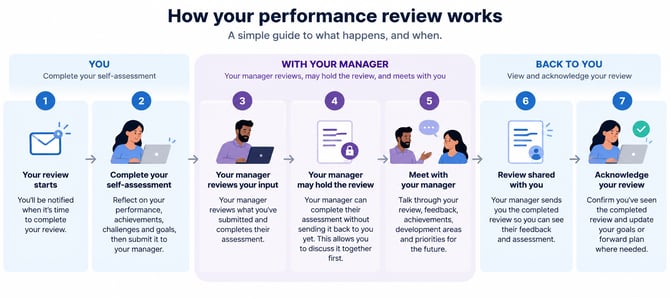
For example, your review may have been Submitted and be waiting for your manager. It may be With Your Manager while they're completing their assessment, or Sent when your manager has shared their completed feedback with you.
Managers may also see a review as Held when they've completed their assessment but haven't yet released it to the employee.
Starting your self-assessment
Open your review when you're ready to begin your self-assessment.
Your self-assessment is your opportunity to reflect on your performance before your manager completes their assessment.
It's designed to provide the foundation for a productive performance conversation rather than simply being a form to complete.
You can save your work as a draft and return to it before submitting.
Confirming your manager
Your review is connected to the person you've selected as your manager.
Check that the correct manager is selected before submitting your review.
This manager relationship is also used elsewhere in Performance & Growth. For example, your goals and reviews can appear in the appropriate Team Goals and Team Reviews areas for your manager.
Selecting goals for discussion
Your review can include goals you want to discuss with your manager.
Select the goals that are relevant to this particular review.
You don't need to include every goal. Choose the ones that will help you and your manager have a useful conversation about your performance, achievements, challenges or development.
For example, you might include a major goal you've successfully completed, or a goal where progress has been slower because you've needed additional support.
Your manager will be able to see the goals you've selected as part of the review.
Selecting feedback for discussion
You can also select feedback you've received that you'd like to include in the review.
Again, the objective isn't necessarily to include everything.
Choose feedback that provides useful context for the performance conversation. This could include positive feedback demonstrating a particular strength or constructive feedback that has helped identify a development opportunity.
Completing your competency assessment
Your review may include competencies that your organisation has chosen to assess.
For each competency, select the rating that best reflects your performance and add comments where appropriate.
Be honest and specific when assessing yourself.
A rating such as Meets Expectations is a positive result. It means you're performing at the level expected for your role.
Where possible, use your comments to provide examples that explain your rating rather than relying on the rating alone.
Your overall self-rating is calculated from your competency ratings.
Completing your reflections
Your review may include reflection questions covering areas such as your key achievements, challenges and development priorities.
Use these questions to think about the review period as a whole.
Consider what went particularly well, what was difficult, what you learned and where you'd like to develop further.
The exact questions may differ depending on the Assessment Template your organisation is using for the review.
Goals and your forward plan
The review can also help you look ahead.
Your Goals & Forward Plan may cover areas such as annual goals, priorities for the next one or two quarters and development goals.
Think about what you want to achieve next, where you want to develop and any support you may need from your manager or organisation.
Saving your review as a draft
You don't need to complete your self-assessment in one session.
Use Save Draft if you want to keep your work and return to it later.
This can be useful if you want additional time to think about your responses or gather examples before submitting the review.
Submitting your self-assessment
Once you're happy with your self-assessment, submit the review.
Your responses, including the goals and feedback you've chosen to include, are then available to your manager.
Your review status will change to show that your part of the process has been submitted and the review has moved to the manager stage.
Completing a review as a manager
If an employee has selected you as their manager, their review will appear in Team Reviews when there's a review for you to manage.
Open the review to see the employee's completed self-assessment.
You'll be able to review their selected goals and feedback, competency ratings, comments, reflections and forward plan.
This gives you the employee's perspective before you complete your own assessment.
Adding manager ratings and comments
As the manager, complete your assessment alongside the employee's self-assessment.
For competencies, you'll be able to provide your own rating and comments.
Sometimes your rating and the employee's rating will be the same. In other cases, they may be different.
A difference doesn't automatically mean one person is right and the other is wrong. It can provide a useful starting point for the performance conversation.
For example, an employee may believe they're exceeding expectations in a particular area while their manager believes they're meeting expectations. Discussing why each person reached that conclusion can help clarify expectations and identify opportunities for development.
Adding the manager summary
Complete the manager summary and feedback to provide your overall perspective on the review period.
Focus on the employee's performance, achievements, development and the areas you want to discuss together.
Specific examples generally make this feedback more useful than broad statements.
Saving, holding or sending the manager review
As a manager, you have several options when completing the review.
Save as Draft lets you continue working on your assessment later.
Complete & Hold completes your manager assessment without immediately sending it to the employee.
This can be useful when you want to complete the written assessment before a scheduled performance conversation. You can meet with the employee, discuss the review together and then release the completed assessment afterwards.
Complete & Send to Employee completes the manager assessment and makes it available to the employee.
Reviewing your manager's assessment
Once your manager sends the completed review, you'll be able to see your original self-assessment together with your manager's assessment.
This allows you to compare your perspectives and use the review as the basis for your performance conversation.
Review the manager's ratings, comments and overall feedback carefully.
Where your perspectives differ, use the conversation to understand why and agree on what happens next.
Updating your forward plan
Following the review discussion, you can update your Goals & Forward Plan where appropriate.
This helps turn the performance review into practical next steps rather than leaving it as a record of what has already happened.
Your forward plan might include new priorities, development goals or areas you and your manager have agreed to focus on.
Acknowledging your review
Once you've reviewed your manager's feedback and completed the performance conversation, select Acknowledge Review.
Acknowledgement confirms that you've received and reviewed the completed assessment.
It completes the employee stage of the review process.
Downloading your review
Your performance review can also be downloaded as a PDF.
The PDF provides a record of the completed review, including the information captured during the assessment process.
This can be useful if you want to retain a copy of the review outside MyHub.
Keeping reviews connected to ongoing performance
A performance review is most useful when it builds on the activity that's already happening throughout Performance & Growth.
Goals provide a record of what you've been working towards.
Feedback provides examples and perspectives gathered throughout the review period.
1:1 meetings provide opportunities for regular discussion.
The performance review brings these elements together into a structured conversation between you and your manager, before helping you establish priorities and development areas for the next period.